
1 Reply
Want to contribute to this discussion?
 Sign In
 To control the transfer process, create a connection profile in the FTP Manager Lite.
Watch the video tutorial to see how to establish a connection: https://www.youtube.com/watch?v=GgOYdpmHq_U
First, open FTP Manager Lite on your Windows PC and click File >> New Connection Profile. Select Transfer files between a PC folder and a Mobile device. Navigate to next page and enter ID and password from your Android device in FTP Manager Lite. Then click on Test Connection to check whether the connection with your server is successful.
Once you have created the connection profile, you will see your SD card in File Manager. Select the files to transfer from your SD card to the PC folder.
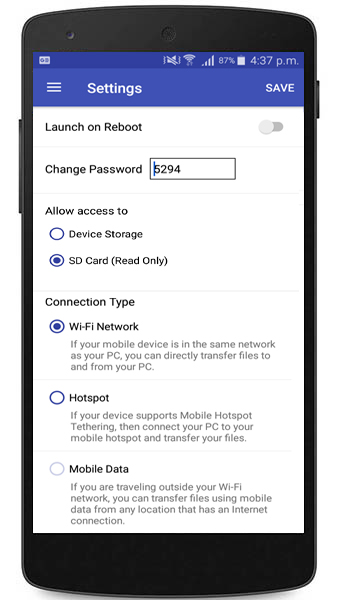
Note:- If you are using Android version 5.0 or above then the SD card storage is Read Only. This means you cannot save files from your PC onto the SD card.
To control the transfer process, create a connection profile in the FTP Manager Lite.
Watch the video tutorial to see how to establish a connection: https://www.youtube.com/watch?v=GgOYdpmHq_U
First, open FTP Manager Lite on your Windows PC and click File >> New Connection Profile. Select Transfer files between a PC folder and a Mobile device. Navigate to next page and enter ID and password from your Android device in FTP Manager Lite. Then click on Test Connection to check whether the connection with your server is successful.
Once you have created the connection profile, you will see your SD card in File Manager. Select the files to transfer from your SD card to the PC folder.
Note:- If you are using Android version 5.0 or above then the SD card storage is Read Only. This means you cannot save files from your PC onto the SD card.
 ▾
▾
